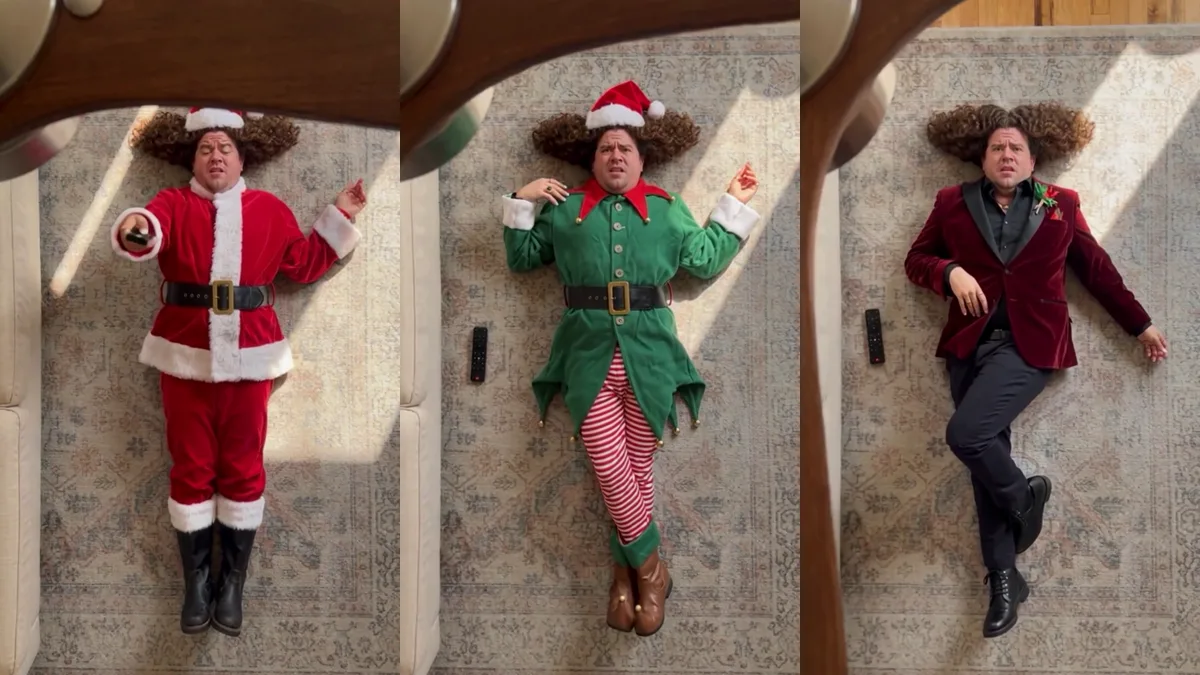
The AI ceiling fan trend is a TikTok video format where a phone seems to hang from a ceiling fan and film someone lying on the floor. Every time a fan blade sweeps across the lens, the person shows up in a different outfit. It started in late September 2026, most of the clips are made with AI from a single photo, and the real life remakes that try it without AI are some of the funniest videos in the trend. It has nothing to do with the "ceiling fan trends 2026" articles about home decor or the "summer mode" setting on your fan.
What is the ceiling fan trend on TikTok?
It is a 10 to 16 second outfit change video shot from straight above. You see the wooden or metal blades of a ceiling fan in the foreground, a person lying on a rug below and sunlight on the floor. A blade passes over the camera, and when it clears, the clothes are different. Most clips show four outfits. A few show three.
People call it a lot of things:
- AI ceiling fan trend or ceiling fan trend AI
- TikTok ceiling fan trend
- ceiling fan outfit change
- ceiling fan transition trend
- under the fan video
The joke works because nobody really mounts a phone on a spinning fan. The shot looks impossible, and the outfit changes happen exactly where the blade hides the cut.
Where did the AI ceiling fan trend start?
The earliest post we found is from SHABA STUDIO on September 24, 2026. It shows a wooden fan with "Shabastudio" printed on the blades, a person lying on a Persian rug and four outfits in 16 seconds. TikTok marks it as AI generated. The caption sums up the whole idea: "Pick four outfits, add your photo (clean closeup shot) and let the ceiling fan do the styling." By October 22 it had about 1.6 million views.
Copies followed within days. On September 30 a CapCut template called "Cross-dressing" appeared, and its preview is the same Shabastudio clip, fan blades and all. By October 22 that template had been used 12,801 times. The Tab wrote up the trend on September 28, and tutorial accounts are still posting new walkthroughs that mention CapCut, Higgsfield and PixVerse.
Is the ceiling fan trend real or AI?
Almost all of the polished versions are AI. The giveaway is the same in every clip: the rug and the light stay perfectly still while the clothes, the shoes and even the hair accessories change completely in a fraction of a second.
That is what made the real life versions blow up. The most viewed ceiling fan video we found is not an AI clip at all. It is a creator lying on the floor and rolling around with the caption "trying the ceiling fan trend but I didn't realise people were using AI...", and it passed 22 million views. Other creators followed with "ceiling fan trend with NO AI" and #notai remakes.
If you want to try a real version, keep the fan switched off. A phone taped to a moving blade can fly off, and the clip works just as well if you film from a shelf or a tripod and wave something past the lens for the cut.
How do you make an AI ceiling fan video from one photo?
You need one clear photo and a tool that does the outfit changes for you. There are two common routes.
The first is a CapCut template. You find a TikTok post tagged with the trend, tap the template link, add your photo and export. You get whatever outfits the template creator picked.
The second is the ceiling fan outfit transition generator on EAST.IM. It works like this:
- Upload one photo of yourself, from head to shoes if you can, or one photo of your pet.
- Pick an outfit theme, or leave it on Random.
- Pick 480p, 720p or 1080p and press Create video.
The camera, the fan, the rug and the sunlight stay the same as the original clip. You lie in the middle of the rug and change outfits four times, once each time a blade passes. The finished video is about 15 seconds long, vertical and keeps the original audio.
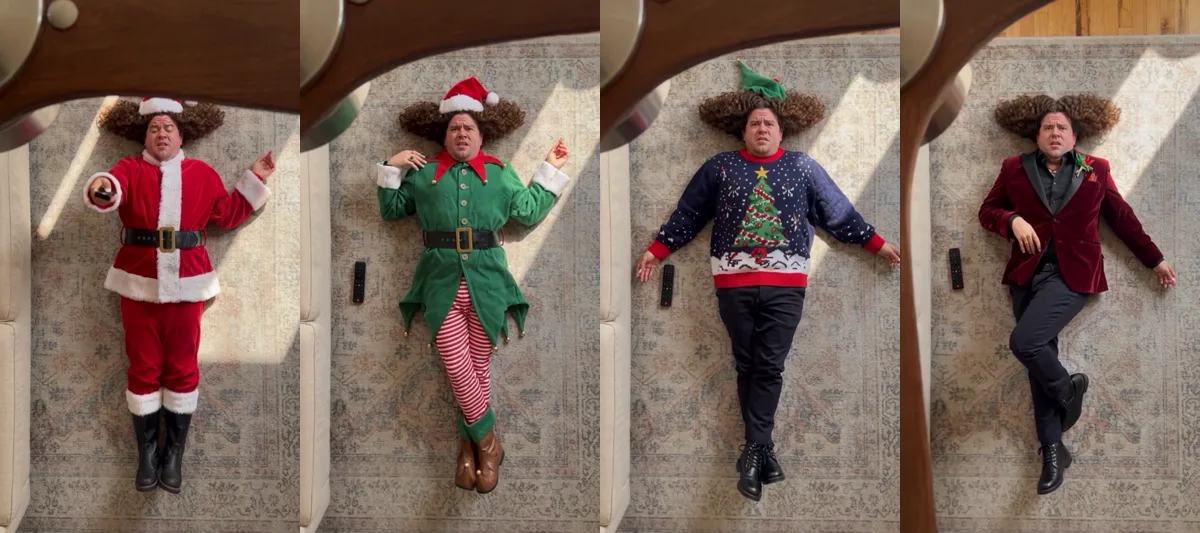
When we tested the Christmas theme, the four looks were a Santa suit, an elf costume with striped tights, an ugly Christmas sweater and a red velvet party blazer. Each change landed right as the blade covered the frame, and the face and curly hair stayed the same in all four.
Which outfit themes can you pick?
There are 15 themes, and all four outfits stay inside the one you choose.
| Theme | Example looks |
|---|---|
| Random | Four unrelated styles |
| Summer | Sundress, linen shirt and shorts, beach cover-up |
| Spring and Fall | Trench coat, denim jacket, cardigan, midi skirt |
| Winter | Puffer jacket, wool coat, chunky sweater, scarf and boots |
| Christmas | Santa suit, elf costume, ugly Christmas sweater |
| Halloween | Witch, vampire, skeleton, mummy |
| Valentine's Day | Red, pink and white date outfits |
| Lunar New Year | Red and gold festive looks |
| Chinese | Hanfu, qipao, tangzhuang |
| Japanese | Kimono, yukata, hakama |
| Indian | Sari, lehenga, kurta, sherwani |
| Arabic | Abaya, kaftan, thobe with keffiyeh |
| Mexican | Folklorico dress, china poblana, charro suit |
| Medieval | Royal gown, knight armor, cloak |
| British | Tartan suit, tweed, trench coat |
Holiday themes are the obvious pick before Halloween and Christmas. The culture themes work well for heritage posts and for showing four traditional looks in one clip.
Can men and pets do the ceiling fan trend?
Yes. The outfit change works for anyone. The AI picks clothes that suit the person in the photo, so a man gets menswear in every theme, like a Santa suit and a velvet blazer for Christmas or a sherwani for Indian.
Pets work too. Upload a photo of your dog or cat with its whole body in view and it lies on the rug in pet sized outfits. Pets do not lie as still as people, so expect a few odd results.
What song is used in the ceiling fan trend?
There is no single song. Most clips use the creator's own original sound. Tracks named on popular posts include "Swipe Up Cash Out" by Danny Faye, "Smile" by Lily Allen and "The Blue Danube." If you make yours with a template, you can swap the audio in CapCut before you post.
Is "ceiling fan summer mode" the same thing?
No. Ceiling fan summer mode is a home tip, not a video trend. In summer a ceiling fan should spin counterclockwise when you look up at it, so it pushes air down and cools the room. In winter you switch it to clockwise. Both show up when you search for ceiling fan videos on TikTok, but only one of them changes your outfit.
How much does an AI ceiling fan video cost and how long does it take?
On EAST.IM each video costs 800 credits at 480p, 3,500 credits at 720p or 8,000 credits at 1080p. It is usually ready in 10 to 20 minutes and stays in My Videos for 48 hours. If a video fails, the credits go back automatically.