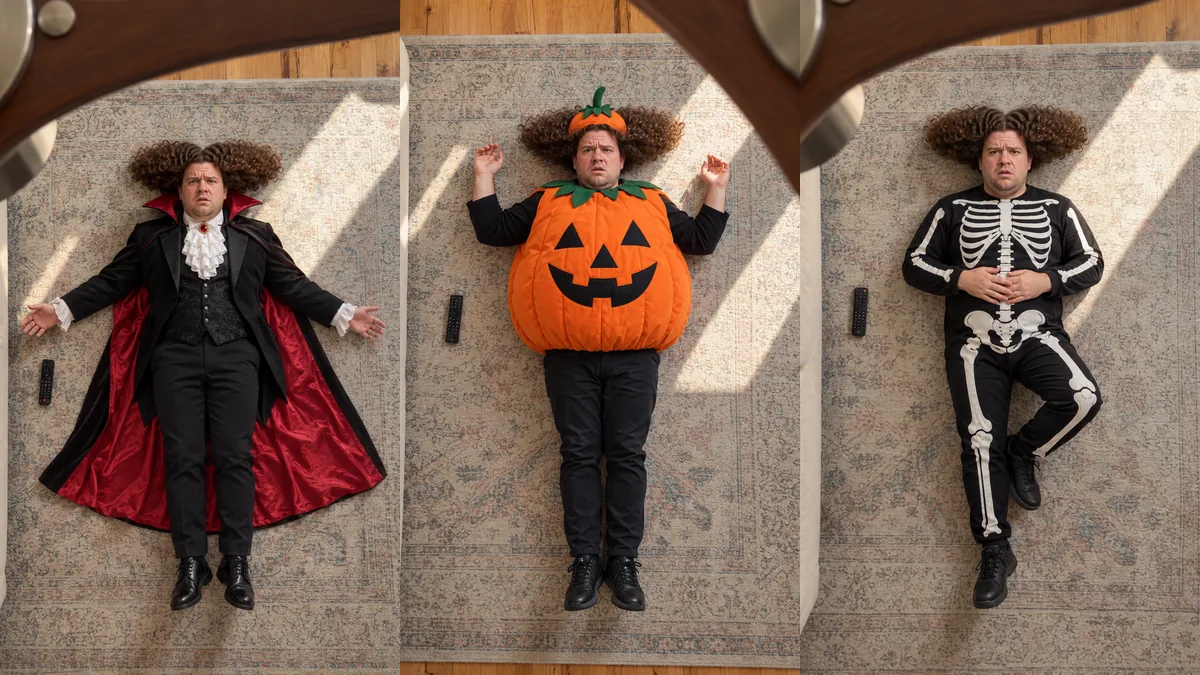
Halloween transition AI means using an AI video tool to make a Halloween costume transition from a photo, instead of filming the outfit change yourself. On TikTok a Halloween transition is a short clip that starts in everyday clothes and cuts to a costume on a snap, a jump or a hand over the lens. The AI version skips the costume, the makeup and the retakes. With the Halloween theme of our ceiling fan template you get four costumes in one 15 second vertical video, each revealed as a fan blade sweeps past the camera. It is not a pack of spooky editing effects or a slide transition, and you do not write a prompt.
What is a Halloween transition on TikTok?
A Halloween transition is a costume reveal. The clip opens on you in a hoodie or jeans, often with a caption like "Halloween costume loading", and one quick cut later you are a clown, a vampire or a pirate. The cut lands on a beat in the sound, so the change feels like a magic trick.
The hashtag #halloweentransition fills up every October with these clips. Friends and couples do them together, makeup artists use them to show a full face of special effects makeup and groups use them to reveal a matching costume. Halloween 2026 falls on a Saturday, so you will also see the "Saturween" joke in a lot of captions this year.
What does Halloween transition AI mean?
It means the costume comes from AI instead of your closet. You upload a photo and an AI video model builds the clip, so you can wear a costume you do not own and change into more than one in the same video.
You will see two kinds of AI Halloween transitions:
- One look reveals. CapCut AI templates turn a single photo into one spooky character, like a witch, a gothic doll or a sweet to spooky makeup change. You get one transformation per template.
- Multi costume transitions. The clip changes your outfit several times. Our Halloween ceiling fan video is this kind: four costumes, one after the other, all in the same scene.
Both are made from a photo. The difference is how many looks you get and whether you pick a template or a theme.
What are some Halloween transition ideas you can film yourself?
The best ones hide the cut behind a quick motion. These are the setups that keep coming back in Halloween transition videos:
- The snap. Snap your fingers in front of the camera, then cut to the costume on the same frame.
- The cover. Put your hand, a hat or a pillow over the lens and pull it away in costume.
- The jump. Jump in your normal clothes and land in the costume.
- Upside down. Flip the phone or film from a low angle for the reveal shot.
- The makeup wipe. Wipe a hand across half your face to show the finished makeup.
- The group reveal. Each friend steps into the frame already in costume, one per beat.
Use a tripod so the background lines up in both shots, and match your pose and distance from the camera before and after the cut. If the room moves even a little, the transition looks like two separate clips.
What songs are used for Halloween transitions?
There is no single song. These are the sounds that show up most in #halloweentransition posts this year:
- "Ramalama (Bang Bang)" by Róisín Murphy
- "Spooky Scary Skeletons" by Andrew Gold
- "Thriller" by Michael Jackson
- "Smooth Criminal" by Michael Jackson, often with a matching costume
Creators also post roundups of niche Halloween transition sounds if you want something less common.
Pick a sound with a hard drop or a clear beat. The reveal should land on it.
How do you make a Halloween transition with AI from one photo?
You need one clear photo and 10 to 20 minutes of waiting. On EAST.IM the Halloween ceiling fan transition works like this:
- Upload one photo of yourself, ideally from head to shoes. A photo of your dog or cat works too.
- Pick the Halloween theme from the outfit list.
- Choose 480p, 720p or 1080p and press Create video.
The camera looks down from a spinning ceiling fan at you lying on a rug. Every time a blade passes over the lens, you are wearing a different Halloween costume. The finished clip is about 15 seconds, vertical (9:16) and keeps the original audio, so it is ready to post on TikTok, Reels or Shorts.
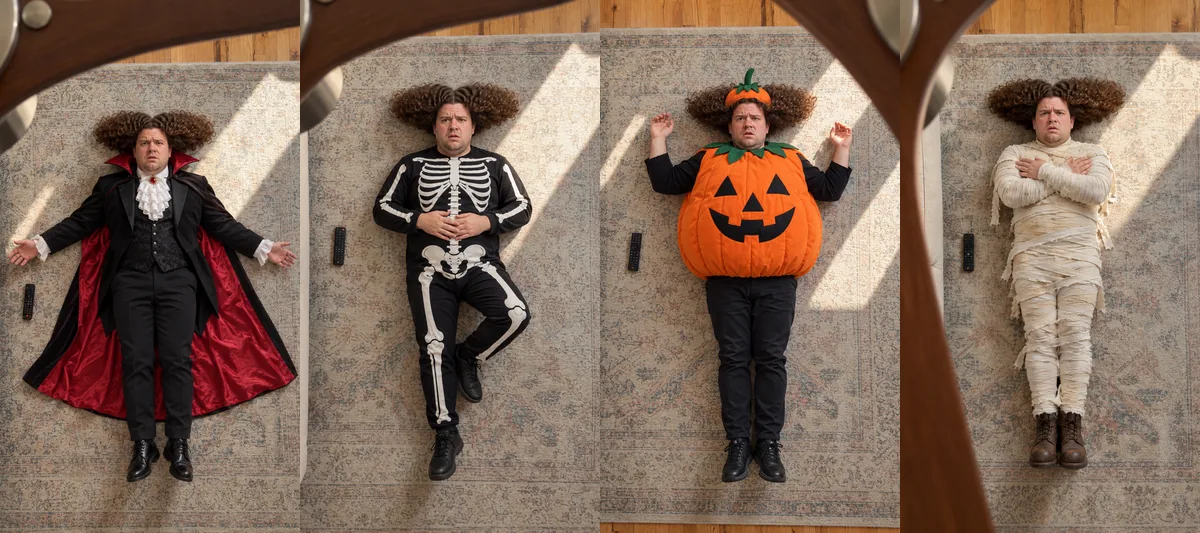
Which Halloween costumes does the AI pick?
The Halloween theme draws from classic costumes like a witch, a vampire, a skeleton, a pumpkin, a mummy and a zombie. Each video shows four of them, and no two look alike in color or cut. If you make the theme twice, you will usually get a different set.
The AI fits the costumes to the person in your photo. A man gets menswear versions of each costume. You cannot pick each costume one by one. You pick the theme and the AI chooses the four looks inside it.
Can you make a Halloween transition with your pet?
Yes. Upload a photo of your dog or cat with the whole body in view and your pet lies on the rug in four pet sized costumes. Pets do not hold still like people, so some results look a bit strange. A sharp photo in good light gives the best chance of a clean result.
AI or real: which Halloween transition should you make?
It depends on whether you want to wear the costume or just show it. Here is how the three routes compare.
| Method | What you need | What you get |
|---|---|---|
| Film it yourself | Costume, makeup, tripod, two takes | One reveal, your real costume |
| CapCut AI template | One photo | One AI look per template |
| Ceiling fan Halloween theme | One photo | Four AI costumes in one 15 second clip |
If you already have a costume for a party, film it yourself. If you want to show several costumes, or you still have not picked one, the AI version gets you there without buying anything.
Can you still make one before Halloween?
Yes. The video is usually ready in 10 to 20 minutes, so you can make it on October 31 and post it the same night. It waits in My Videos for 48 hours. Download the MP4 before then.
How much does an AI Halloween transition cost?
On EAST.IM each video costs 800 credits at 480p, 3,500 credits at 720p or 8,000 credits at 1080p. The price shows on the Create video button before you start. If a video fails, the credits go back to your account automatically.